

This is not an article, and it’s not an advertisement. It’s just a reflection of my desire to share with readers something I find incredibly valuable and would encourage people to consider adopting.
I do not often use Talk of the Sound to promote products or services. Every now and then there is an exception, because I think something is particularly valuable and could be very helpful to readers.
As regular readers know, I love new technology and I am always looking for ways to work faster. Covering this much news means I am spread thin, so anything that saves time matters.
Here is something people may not realize: for the past 18 years I have written Talk of the Sound almost entirely on an iPhone, with one finger. People who have watched me do it in person often find it disconcerting. They cannot believe that is how the stories get written. I am not a good typist. I just adapted to pecking away and got up to about 40 words a minute.
Then I read about a new dictation keyboard in a New York Times Magazine column by Amy X. Wang. The headline was that she wanted to murder the app with a hammer. I read her piece and thought, I have to try that!
I gave it a try, and it has been a revelation. I am now “typing” about 120 words a minute. I use it for pretty much everything. I am not typing this. I am talking.
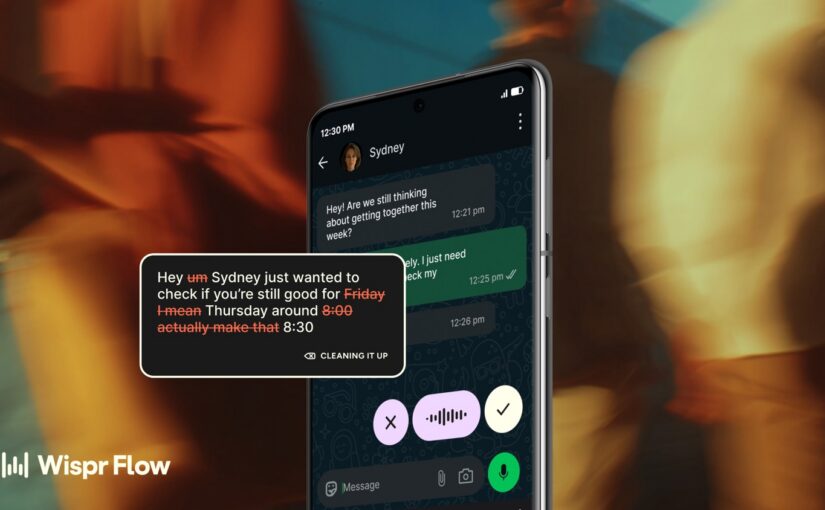
The tool is Wispr Flow.
Apple’s built-in dictation is fine for a sentence. This one lets you talk normally, then cleans up punctuation, grammar, and the “ums.” I use it for texts, email, and dumping a list of tasks into my task app.
But the place I use it most is with AI. I talk into Grok or ChatGPT the way I would talk to a person, and it comes out as clean prompts. That matters. If you make a typo, or your phone’s dictation hears the wrong word, the AI can take off on a tangent that has nothing to do with what you meant. Then it has trouble letting go of that mistake. A bad keyword can turn the whole exchange into a mess. Same thing works with any other AI app.
It is on iPhone and Android. On iPhone, add it as a keyboard in Settings, switch to it, hold the button, speak, tap done. On Android it sits as a button over the app you are in.
If you sign up through this link you get a 1-month Pro trial instead of the usual 2 weeks:
https://wisprflow.ai/r/ROBERT78916
Disclosure: I am offering this because I think the tool is that good. You get a longer free trial. If you later get a Pro subscription through this link, I get a one-month credit on my own subscription. You benefit, and so do I.
If you hate it, delete it. If you like it, you will stop typing.
If you are already using Wispr Flow, I would like to hear your feedback in the comments.
The Times column is here.
This article was prepared with the assistance of AI tools (including Wispr Flow) under the direction and editing of Robert Cox.
Have information about this story? Email robertcox@talkofthesound (preferred) or contact via WhatsApp: +353 089 972 0669.